RoombaComm
[NOTE: RoombaComm is now being actively maintained by Paul Bouchier, Jonathan Pitts & Matt Black (and occasionally me perhaps) on the Dallas Personal Robotics Group site. Check out RoombaComm’s new home! This site will continue to mirror any RoombaComm updates by the DPRG folks. The DPRG site has many great projects and tutorials for building your own robots, be they Roomba-based or not. Thank you so much guys for giving RoombaComm some much-needed attention.]
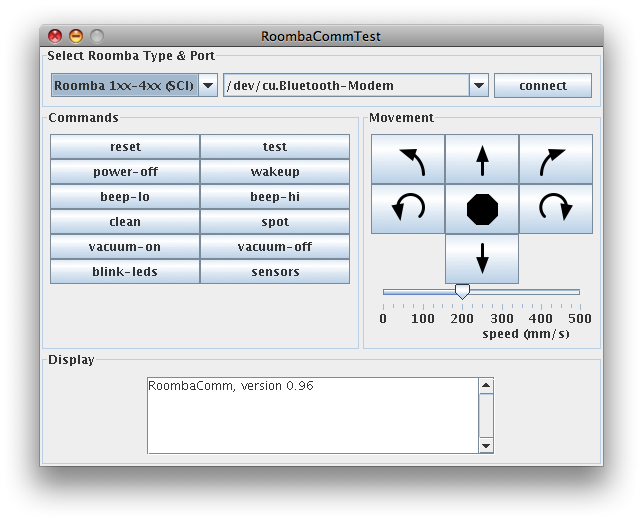
RoombaComm is Java library for communicating and controlling the Roomba. It works on any operating system that RXTX supports. This includes Mac OS X, Linux, and Windows. It also works with Processing. It will soon work with Flash and Max/MSP.
It’s been a work in progress for several months and has gotten a little better as I work through improving it for the book.

Several bugs have been fixed, particularly with respect to Bluetooth on Windows. See the README for some info on that.
Tested systems:
– Mac OS X 10.4 (Tiger) : usb serial & bluetooth
– Mac OS X 10.3 (Panther) : usb serial & bluetooth
– Windows 2000 : usb serial & bluetooth
– Gumstix Linux : built-in serial
Tested adapters:
– Homemade RS-232 adapter
– Homemade Bluetooth adapter
– RooStick USB adapter
Demo command-line programs include:
– DriveRealTime — Drive your Roomba with cursor keys
– RTTTLPlay — Play monophonic ringtones on your Roomba
– Spiral — Roomba drives in ever expanding spiral
– Waggle — Roomba wags like a dog
– BumpTurn — Roomba drives around by itself, avoiding things
– Spy — Read your Roomba’s mind while it works
– Tribble — Roomba purrs and sometimes barks
– RoombaCommTest — Roomba GUI remote control panel (not command-line)
Processing demos include:
– RoombaTune — Play your Roomba like a musical instrument
– RoombaRing — Play RTTTL ringtones on a Roomba
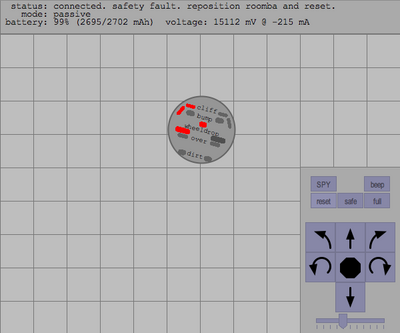
– RoombaView — Full instrument panel and remote control
This is what RoombaView looks like:
Download:
– full package: roombacomm-0.96.zip
– Processing library: roombacomm-processing.zip
– full package, built, with “roombacommtest.bat”: roombacomm-0.96-built.zip
Docs:
– javadoc
– README
– README.windows.txt
– README.eclipse.txt
– CHANGELOG.txt
– the source tree

Thank You again for very fast answer :)
Unfortunately it didn’t help. Still the same error:
“The method connect(String) in type RoombaCommmSerial is not applicable for the arguments connect(String,String)”
Are You sure this method’s version is enabled in roombacomm-processing.zip downloaded from this site?
I have the book, and I have downloaded roombacomm.
The serial port works roomba responds to simple commands (via realterm).
What I don’t see in the RoombaCommTest directory is any file with a .exe extension (Windows XP), so running RoombaCommTest apears to be a little more complex than just clicking on the file’s icon.
I also tried running the RoombaCommTest.bat in the directory ‘roombacomm’ and it throws an exception right off (also has a warning about an RXTX Version mismatch).
I must have missed the idiot’s guide to starting up roombacomm, but it’s not because I’m not looking…
It’s been a while since I wrote any java but I would expect scripts like ‘RoombaCommTest.bat’ to work without much trouble.
(I did copy the dll, rxtxSerial.dll in the right place (C:Program Files\Java\jre6\bin, and C:\Windows\system32)
Sorry to have to bother you with these questions…
Thanks
Hi Richard,
Sorry you’re having problems. Exactly which link did you download, and what is the exact error message you are seeing when you run RoombaCommTest.bat?
You should not need to copy RXTX files anywhre. In fact, I’d recommend you do not do that, otherwise you could cause problems with other things like Processing and Arduino (if you use those)
And apologoies, the book does assume passing familiarity with Java, but I did try to package up pre-compiled versions of all the code and that .bat file.
todbot,
thanks for the fast reply – I removed the RXTX dlls that I copied (re:the readmewindows file).
here’s a dump from my console window that shows the warning and the exceptions:
D:\roombacomm-downloaded\roombacomm>java -Djava.library.path=rxtxlib -classpath
.;rxtxlib/RXTXcomm.jar;rxtxlib/bluecove-2.1.0.jar roombacomm.RoombaCommTest
WARNING: RXTX Version mismatch
Jar version = RXTX-2.2pre1
native lib Version = RXTX-2.1-7
Exception in thread “main” java.lang.IllegalArgumentException: setSelectedIndex:
0 out of bounds
at javax.swing.JComboBox.setSelectedIndex(Unknown Source)
at roombacomm.RoombaCommPanel.makeSelectPanel(RoombaCommPanel.java:313)
at roombacomm.RoombaCommPanel.makePanels(RoombaCommPanel.java:285)
at roombacomm.RoombaCommPanel.(RoombaCommPanel.java:61)
at roombacomm.RoombaCommTest.(RoombaCommTest.java:63)
at roombacomm.RoombaCommTest.main(RoombaCommTest.java:44)
This is the download I took from this page – extracted into this “D:\roombacomm-downloaded” directory.
Rich
Hmm, that’s a really strange Java error. What version of Java are you running? I just tried downloading the “roombacomm-0.96-built.zip” bundle above, extracting it, and double-clicking (or running from command-line) the RoombaCommTest.bat file. It opened up as expected. The RXTX warning is expected. (when the RXTX update is released we’ll update the RXTX library and that warning will go away)
On my system, I had installed a fresh version of Java a month or so ago, and typing “java -version” says “1.6.0_14”. You should also check in your Add/Remove Programs control panel to see if perhaps you have multiple, conflicting versions of Java installed.
I looked into where in the code the error is coming from, and it looks like it’s because RXTX isn’t finding any serial ports on your system. This is a bug. It should fail gracefully if a system has no COM ports. (granted, this is a really rare case) What kind of computer are you running this on and what kind of Roomba interface are you using?
Well, I really am dumb sometimes…
I had the roomba connected to the wrong computer. (It’s not as bad as it sounds.)
The java was recently updated too (1.6.0_16) :)
Thanks, sorry I took this to be a problem with the code.
Everything works fine.
Hi, Is there a way to drive the Roomba back to the Home Base with roombacomm? I couldn’t find a command to do that in the library.
Would you give some advice. Thanks so much.
Hi Long,
In a sense. You can send the “Force-seeking Dock command (opcode 143) to the Roomba using RoombaComm, and that will trigger the Roomba to go into searching for its charging station. From the Roomba Open Interface spec:
Hi todbot,
Thanks for quick reply. I’m sorry to bother you again for what actual command (i.e. roombacomm.spinleft) that I can use to send the opcode 143. A bit of syntax would be helpful. I’m using Processing to control the Roomba 400 series as well as the Create.
Thanks very much
roombacomm.dock();
I don’t know if this question is out-of-bounds or not, but I would like to import roombacomm as a whole project into eclipse. I just made a first attempt at it without actually knowing what to expect.
Will the import wizard successfully get the whole project under control this way?
I’m using a very recently installed/downloaded eclipse
(Build id: 20090920-1017)
Thanks again.
Does it work with the iRobot Create?
Yes it does. Check out my review of the Create:
http://PLACEHOLDER.wpsho/2007/05/17/irobot-create-robot-review/
Thanks. Where can I download a copy of it where I download it and double click it and use it? (Mac osx)
I don’t know anything about Java. (Besides it being a Coffee)
We are not able to get the batch file roombacommtest to run on Windows 7 64-bit (nor can we run any other java-based roomba applications, such as SimpleTest) — can anyone help? By the way, we are able to run all RoombaComm examples on Vista 32-bit platforms.
I got your Book from Amazon, Book is great detail but It will need to update becuase Roomba came out more Newer model. I have Model 530 and at friest I cannot find the 8 Din connector after searching around many website until I found in forum on how to get the connector to be ready for the project.
Is the RoombaComm compatible with the iRobot Roomba® 530? Just because we are working a thesis around swarm robotics and have these at our disposal.
Hi Sjimi,
It should be compatible. The current maintainers of RoombaComm modified it explicitly to do this.
I don’t really know much about the insides of RoombaComm, but under Packaging there is no windows version. When I am on my Mac, there is a program file, but I can’t connect my Roomba to my Mac because I don’t know how to set it up with Snow Leopard. There is not any Windows version of RoombaCommTest. Can you please make one?
i am getting this error:
Stable Library
=========================================
Native lib Version = RXTX-2.2pre2
Java lib Version = RXTX-2.1-7
WARNING: RXTX Version mismatch
Jar version = RXTX-2.1-7
native lib Version = RXTX-2.2pre2
and “java -version” give me:
1.6.0_24
i am running win7 x64,
i have replaced the rxtx for win64 in the Processing folder, but now i get that error.
what should i do ?
thanks
Hello, Your project is very interesting, but I did not understand what is the use of the java libraries Bluecove. Can you tell me, please?
Hi Tod,
I am running RoombaComm on a Mac, attempting to drive a Roomba 560 with a RooTooth dongle.
Whenever I send it the “start”, “full”, “control”, etc. commands nothing happens. It seems like it is connected to the RooTooth, however, because any other command (like “forward”, “spin left”) causes it to begin spot cleaning. Sending “stop” will stop it from cleaning, but sending “stop” a second time will make it start cleaning again. I need to be able to drive the Roomba, but right now all I can do is start and stop spot cleaning, no matter what command I send. Any ideas on what I’m doing wrong?
Thanks for your time,
Lauren
does this thing work on the Roomba 7xx series?
wow – this program definitely looks cool. If anyone is looking for an introductory explanation into the in’s and out of communicating to the roomba, it might be worth checking this out:
http://www.robotappstore.com/Knowledge-Base/3-Serial-Port-Baud-Rate-Configuration/17.html
I’ve had trouble with intermittent communication issues in the past with the roomba, and this helped me understand it a bit more.
I have installed java sdk 1.0.0_03 and added the path to java.exe.
I can run roombacommtest. It works fine, but I get a rxtx mismatch warning when it starts. Jar verion 2.2pre1 native lib ver 2.1-7
It finds com1 and com3, and my serial interface is on com1.
When I try and run runit COM1, I get ERROR: could not find or load main class COM1.
I am new to java, and java apps., so excuse my ignorance, but do you have an idea of what I am doing wrong?
Also, realterm works as well with the com1 115200,n,8,1 when monitoring battery charging and roomba BIT, so communication is working.
Windows xp pro sp3.
Here’s the stack trace in case any of you are java wizards and can figure out what is wrong:
connect-start
Exception in thread “AWT-EventQueue-0” java.lang.NoClassDefFoundError: Could not initialize class gnu.io.CommPortIdentifier
at com.hackingroomba.roombacomm.RoombaCommSerial.listPorts(RoombaCommSerial.java:315)
at com.hackingroomba.roombacomm.RoombaCommPanel.setCommPorts(RoombaCommPanel.java:1478)
at com.hackingroomba.roombacomm.RoombaCommPanel.connect(RoombaCommPanel.java:209)
at com.hackingroomba.roombacomm.RoombaCommPanel.actionPerformed(RoombaCommPanel.java:434)
at javax.swing.AbstractButton.fireActionPerformed(Unknown Source)
at javax.swing.AbstractButton$Handler.actionPerformed(Unknown Source)setCommPorts-start
setCommPorts-portChoices object is not null
setCommPorts-getting list of ports
at javax.swing.DefaultButtonModel.fireActionPerformed(Unknown Source)
at javax.swing.DefaultButtonModel.setPressed(Unknown Source)
at javax.swing.plaf.basic.BasicButtonListener.mouseReleased(Unknown Source)
at java.awt.Component.processMouseEvent(Unknown Source)
at javax.swing.JComponent.processMouseEvent(Unknown Source)
at java.awt.Component.processEvent(Unknown Source)
at java.awt.Container.processEvent(Unknown Source)
at java.awt.Component.dispatchEventImpl(Unknown Source)
at java.awt.Container.dispatchEventImpl(Unknown Source)
at java.awt.Component.dispatchEvent(Unknown Source)
at java.awt.LightweightDispatcher.retargetMouseEvent(Unknown Source)
at java.awt.LightweightDispatcher.processMouseEvent(Unknown Source)
at java.awt.LightweightDispatcher.dispatchEvent(Unknown Source)
at java.awt.Container.dispatchEventImpl(Unknown Source)
at java.awt.Window.dispatchEventImpl(Unknown Source)
at java.awt.Component.dispatchEvent(Unknown Source)
at java.awt.EventQueue.dispatchEvent(Unknown Source)
at java.awt.EventDispatchThread.pumpOneEventForFilters(Unknown Source)
at java.awt.EventDispatchThread.pumpEventsForFilter(Unknown Source)
at java.awt.EventDispatchThread.pumpEventsForHierarchy(Unknown Source)
at java.awt.EventDispatchThread.pumpEvents(Unknown Source)
at java.awt.EventDispatchThread.pumpEvents(Unknown Source)
at java.awt.EventDispatchThread.run(Unknown Source)
connect-start
Exception in thread “AWT-EventQueue-0” java.lang.NoClassDefFoundError: Could not initialize class gnu.io.CommPortIdentifier
at com.hackingroomba.roombacomm.RoombaCommSerial.listPorts(RoombaCommSerial.java:315)
at com.hackingroomba.roombacomm.RoombaCommPanel.setCommPorts(RoombaCommPanel.java:1478)
at com.hackingroomba.roombacomm.RoombaCommPanel.connect(RoombaCommPanel.java:209)
at com.hackingroomba.roombacomm.RoombaCommPanel.actionPerformed(RoombaCommPanel.java:434)
at javax.swing.AbstractButton.fireActionPerformed(Unknown Source)
at javax.swing.AbstractButton$Handler.actionPerformed(Unknown Source)setCommPorts-start
setCommPorts-portChoices object is not null
setCommPorts-getting list of ports
at javax.swing.DefaultButtonModel.fireActionPerformed(Unknown Source)
at javax.swing.DefaultButtonModel.setPressed(Unknown Source)
at javax.swing.plaf.basic.BasicButtonListener.mouseReleased(Unknown Source)
at java.awt.Component.processMouseEvent(Unknown Source)
at javax.swing.JComponent.processMouseEvent(Unknown Source)
at java.awt.Component.processEvent(Unknown Source)
at java.awt.Container.processEvent(Unknown Source)
at java.awt.Component.dispatchEventImpl(Unknown Source)
at java.awt.Container.dispatchEventImpl(Unknown Source)
at java.awt.Component.dispatchEvent(Unknown Source)
at java.awt.LightweightDispatcher.retargetMouseEvent(Unknown Source)
at java.awt.LightweightDispatcher.processMouseEvent(Unknown Source)
at java.awt.LightweightDispatcher.dispatchEvent(Unknown Source)
at java.awt.Container.dispatchEventImpl(Unknown Source)
at java.awt.Window.dispatchEventImpl(Unknown Source)
at java.awt.Component.dispatchEvent(Unknown Source)
at java.awt.EventQueue.dispatchEvent(Unknown Source)
at java.awt.EventDispatchThread.pumpOneEventForFilters(Unknown Source)
at java.awt.EventDispatchThread.pumpEventsForFilter(Unknown Source)
at java.awt.EventDispatchThread.pumpEventsForHierarchy(Unknown Source)
at java.awt.EventDispatchThread.pumpEvents(Unknown Source)
at java.awt.EventDispatchThread.pumpEvents(Unknown Source)
at java.awt.EventDispatchThread.run(Unknown Source)
Here’s the tutorial I used to compile the Java application:
http://pharos.ece.utexas.edu/wiki/index.php/How_to_use_the_RoombaCommTest_to_Control_the_iRobot_Create
I’m willing to try something else, actually it would be much preferable to program the roomba with python or perl. I really, really hate Java.
Hi, i have a problem with rooombacomm and a roomba 520, the datas of the sensors are wrong in roombacomm . The command of motors or led or musique works fine.
Thanks for you help.
Fabrice.
did anyone got this working with win7 64 bit ?
i changed RXTX libary to 64bit version, still get some errors
Exception in thread “main” java.lang.IllegalArgumentException: setSelectedIndex: 0 out of bounds
at javax.swing.JComboBox.setSelectedIndex(Unknown Source)
at roombacomm.RoombaCommPanel.makeSelectPanel(RoombaCommPanel.java:313)
at roombacomm.RoombaCommPanel.makePanels(RoombaCommPanel.java:285)
at roombacomm.RoombaCommPanel.(RoombaCommPanel.java:61)
at roombacomm.RoombaCommTest.(RoombaCommTest.java:63)
at roombacomm.RoombaCommTest.main(RoombaCommTest.java:44)
thanks in advance samuel