RoombaMidi2: A better OS X MIDI interface for Roombas

Make your Roomba a musical instrument!
RoombaMidi2 is a small Mac OS X program that makes your Roomba appear as a MIDI interface to MIDI sequencer programs like Ableton Live, Apple Logic, and so on. RoombaMidi2 is an update of the original Java-based RoombaMidi.
The CoreMIDI-to-Java APIs provided by Apple look to be getting deprecated (as are all Apple-specific Java APIs). To get around any problems, the updated RoombaMidi2 is written in Objective-C for the GUI and C for the “roombalib” Roomba control API.
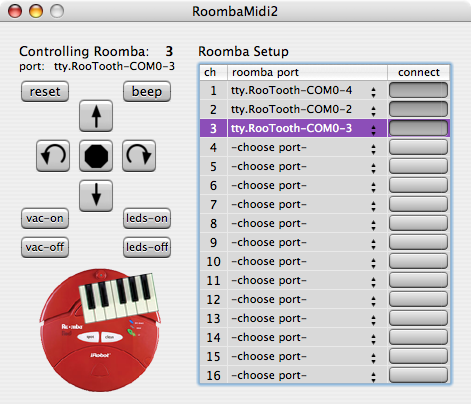
The result is functionally identical to the original version and looks like:
MIDI Implementation
You can have up to 16 different Roombas, one per MIDI channel. The virtual MIDI interface appears as “RoombaMidi2 In” on your sequencer program. Within a channel, different notes do different things:
- note numbers 32-127 (G0 and up):
- notenum is note, played thru beeper
- velocity is duration in number of 1/32s of a second (e.g. 32==1second)
- note number 24 (C0):
- main vacuum, on = non-zero velocity, off = zero velocity (note off)
- note number 25 (C#0):
- blink LEDs, velocity is color of Power LED
- note number 28 and 29 (E0 & F0):
- spin left or right, velocity is speed of spin, note off is stop
- note number 27 and 30 (Eb0 & F#0):
- move forward or backward, velocity is speed, note off is stop
A typical use looks something like:

Download RoombaMidi2
- RoombaMidi2.tgz — the app, just download and double-click to uncompress.
- RoombaMidi2-source.tgz — full source code, includes the C roombalib API.
- RoombaMidi2-Help.html — help file, also available from within the app.
Example
Roombas Go Caroling
(revver link)
Caveats
The “tipsiness” evident in the Roombas’ performance above is caused by the fact that the Roomba protocol doesn’t really support real-time musical note playing. Normally you define little 16-note songs and play them back, so to play a single note you have to fake it by defining a one-note song and then playing it back. The other timing problem is Bluetooth serial doesn’t make any guarantees on delivery time so it varies by several milliseconds. To get tighter timing, use a serial tether, try making slower songs, or break up your songs into 16-note pieces and send the pieces instead.
43 comments

Cool I’m the first! One question, how come you removed some of the features?
use a tol called mightymidi
Hi there, and thanks for your great Roomba site!
I’m making a roomba installation for the Robodays festival in denmark.( http://www.robodays.dk/ )
I’ve gotten my hands on five Roomba 562 pet’s. But I can’t get them to work with RoombaMidi2.
Whenever I send a midimessage from Ableton ->RoombaMidi2->RooTooth on to the Roomba, it beeps 3 times, and begins to vacuum clean.
In other words, the only functions I have is on/off via Rootooth no matter what midi note I send it.
Am I doing something wrong or are the 562 pet maybe too new for RoombaMidi2?
Really hope you can help!
Cheers,
Andreas
Hi Andreas,
Yes, iRobot slightly changed the protocol on the newer Roombas. The RoombaComm Java library has had effort to make it work with the new Roombas. I believe the only necessary change is to change the baud rate from 57600 to 115200.
You can try this yourself with the source. I just did a rebuild of the source with that baud rate. I have no way of testing it though, but here it is:
http://roombahacking.com/software/roombamidi/RoombaMidi2-newRoombas.zip
Let me know if it works for you.
Hi Tod,
Thx a billion for making new software availiable and getting back to me this fast.
However, I can’t get any change in the behaviour and response from the Roomba with the ‘RoombaMidi2-newRoombas’.
Any message from ableton or ‘RoombaMidi2-newRoombas’ still only turns the machine on or off.
Should I do anything else than just install ‘RoombaMidi2-newRoombas’ and use it as is?
Cheers,
Andreas
PS. I you are interested I will be happy to mention you and/or your site in the signs next to the installation.
Hi Andreas,
Can you drive around the Roomba with the buttons on the left after you connect? Can you make it beep with the “beep” button? Those are there to let you test out the Roomba connection before sending MIDI.
Hi Tod,
Sadly, no buttons in the RoombaMidi2 interface affect the Roomba the way they should.
The reset, beep, forward, backwards, spin right and spin left button all do the same thing: Turn on the Roomba. Pressing any of the above keys again stops the Roomba.
The 4 lower buttons have no effect when pressed.
Cheers,
Andreas
Also, I’m considering contacting Roomba again and ask them to send me earlier models in order to get me up and running with your app.
It’s a long shot though, I’m not sure they’re willing to give me that.
Can you tell me what Roombas are 100% surely working with RoombaMidi2?
Regards,
Andreas
First, sorry to spam your forum this way.
I spoke to Roomba in Denmark and they are not able to give me either 400’s or Create’s. They are not in production anymore and not for sale here.
So I have no choice but to go on with the 562 PETs.
Can you imagine any other solutions to my problems?
Kind Regards,
Andreas
Hi Andreas,
Have you been able to get the RoombaCommTest program working with your Roomba?
Also, have you tried starting with the Roomba already turned on?
Have you been able to get the RoombaCommTest program working with your Roomba?
I’ve downloaded the files but I can’t find any file that enables me to start RoombaCommTest. Wonder what I’m doing wrong.
Also, have you tried starting with the Roomba already turned on?
I have only tried starting with the Roomba already turned on.
I think I may have explained myself wrong, when I wrote:
The reset, beep, forward, backwards, spin right and spin left button all do the same thing: Turn on the Roomba. Pressing any of the above keys again stops the Roomba.
What I meant was:
The reset, beep, forward, backwards, spin right and spin left button all do the same thing: Roomba plays 3 notes and then starts cleaning(same effect as a manual start). Pressing any of the above keys again stops the Roomba cleaning.
Sorry for the bad English.
Best,
Andreas
Trying out the Roomba SE with the Rootooths and RoombaMidi:
No response from RoombaMidi2 – interface
Midi notes C0 and C1 from Ableton to RoombaMidi2 turns the Roomba on and off.
Is the SE running at baud 57600?
Best,
Andreas
And now it’s working – with the Roomba 415:)
I will give up on my 562 PETs now and go shopping for 415’s since they are the only ones I have gotten to work.
Best wishes,
Andreas
Hi Andreas,
Sorry you’ve been having all this trouble. Can you detail for me how exactly you’re connecting your Roombas to your computer?
Also, if you ever have Roomba weirdness, one thing to always try is to remove the battery from the Roomba and re-insert it. Sometimes the Roomba serial port gets in a strange state and removing power temporarily fixes it.
About RoombaCommTest: visit the RoombaComm page and download the “full package built” zip file.
Once you unzip it, you should find a file called “RoombaCommTest.sh”. If you open up the Terminal and “cd” to the directory that file is in, you can run it by doing “./RoombaCommTest.sh”. You should get a little Java app that lets you select Roomba protocol & serial port, and do various remote control of the Roomba (similar to what the left panel of RoombaMidi2 lets you do)
If that program works, but that RoombaMidi2-newer doesn’t, then I have a better idea what’s going on.
Thanks for the info on RoombaComm!
I have obtained two 415s and will continue down that path getting one more at least. The 562 PETs will be used at the festival for other artistic purposes(and perhaps some cleaning:))
So I’m beginning the programming process with the unmodified version of RoombaMidi2 and Ableton Live.
If possible, I will link to Your site from robodays.dk and elsewhere.
Cheers,
Andreas
Here are my first results:) http://www.youtube.com/watch?v=YNuyoabQ5mc
That’s so adorable, Andreas! It will be a big hit.
Thanks!
Hi Tod,
Robodays in Odense are over and my exhibition was a success!
I where there wednesday to saturday showing the choreography and melodies of my three Roomba 415’s to hundreds of amused museum guests. I have already recieved invitations to other festivals and events during Robodays so I’m more than satisfied.
I’ve recieved great help from the community at robotreviews.com but couldn’t possibly have done it without the exellent RoombaMidi2 and your advice.
Thanks a lot!
Andreas
Here are the complete choreography and melody – recorded at the conservatory I study at.
http://www.youtube.com/watch?v=WmBjC08JCeM
Sorry if this is the wrong forum. I just found this way to ask a wish.
I wish to have a quiet roomba hold my Macbook laptop and follow me around the house.
I am running video chat and always carrying my laptop around. It’d be nice to not have to do that.
And no, I don’t want to put webcams all over the house, I want to be able to pick the laptop off roomba to bring the cam near my face when needed.
I guess this could be some sort of module that just plugs into the roomba and come with a simple laptop stand. Probably need a small transmitter to carry around but it would sure be nice if it followed base on body heat or something natural for us.
Thanks for tips
Hello does this work with the Create?
Hi Ben,
Yes, it should. Check out my review of the Create: http://PLACEHOLDER.wpsho/2007/05/17/irobot-create-robot-review/
Ok how do I send commands to the Create. Zterm isn’t working. It crashes at startup.
I am trying to “play” if you will, the “Home” demo. (Where is goes to a virtual wall)
from my computer. i know the command is 136 (9) but how do I tell the Create that.
BTW I bought your book.
You should create a RoombaMidi where you have the GUI but you can also send your own commands (Via text) inside the application to the roomba!
Hi Tod, yeah I did buy your book, mainly just to give you a donation, but is it possible to please modify roombamidi to have a text interface within the App to support commands that you can type your self or add some commands for the Create? I doubt it would be too hard…
I would do it if I had the time and experience but I don’t. :)
dennisdahl3 Yeah it is the wrong place. Try RoombaComm. I can help you with that though. Wouldn’t be hard… Do you live in America?
Yeah so when I try to open RoombaMidi is crashes. This (RoombaMidi2) opens fine and works fine. Anyway, Tod, if you would make the request I asked I was thinking have something that looks like the Display box in RoombaMidi but you can type commands…
Bi!
Hi Ben,
I’d like to but all my Roomba stuff is in storage. You might want to try the command-line “roombacmd” tool. It’s in the embedded-linux roomba tools section (roombacmd source code here), but will work on just about any OS.
With it you can send text commands to a Roomba, like:
It’s quick to build yourself if you’ve done any sort of Makefile-style compiling. If not and you’re on Mac OS X, I just placed a compiled version of it here: roombacmd-macosx.
Ok shame why is it in the garage? Even your create? Shame on you! :)
Anyway thanks but the pre-compiled link when I click it it just shows me a page of
text.
Like this but ALOT longer. I am guessing it is the source code. Is it supposed too??
Êþº¾
Sorry if I am sounding like a complete idiot. I am really new to the Roomba scene.
Sooo Sorry. I am a Mac user (12 years and counting) and am very familiar with Terminal. Is it supposed to be a shell script? Or is it a terminal like app?
Thanks a lot. So is there anyway to receive it so when I get it I can double click it and type my commands??
I am anxiously wondering too. I bought my create but I really need to k now how to set a demo. Until then it will just sit here…
Not sure why you’re seeing a page of text. Perhaps your browser isn’t detecting the file type, so try right-clicking and doing Save As…
Ok. I double click the file it open up terminal and then…
Nothing…
yes, it’s a command-line program. You do not double-click it. You’ll need to type in a series of text commands in Terminal. Some examples are given above.
Examples? Should I type something in terminal? It doesn’t tell me to. What should I type…
BTW Your book is amazing. I like the Linux on the Roomba just not Linux in the Roomba. Do you have the code for RoombaSpiro Available?
… Tod?
Hello
Controlling RC Car from Computer (Wireless or Wired)1
The title basically says it all. I am making a robot and am using a fairly large RC car and I need some way to drive it from the computer. It could be anyway as long as it is under 100 dollars and is not getting a different car, (unless the car is big and under 100USD) I know that some people online have had success but there are not to many clear guides. I was hoping for something that is really easy to plug in to the PCB. I have an idea on how to do it (applying the voltages) but I am new to electronics wiring etc…
Any help? Mac/Linux is preferred but something easy in Windows is ok.
It can be wireless (RF) or wired…
Thanks in advance!
Ben
ok…
[…] Fuente: Roomba midi en Hacking Roomba. […]
[…] Software wurde in Objective-C und C geschrieben und ist kostenlos beim Hersteller herunterzuladen. Ebenso findet man eine ausführliche Dokumentation der Software. Es ist schon die zweite Version […]